Best CO2 Laser Engraver 2026 (Plus Diode and Fiber Picks)
Laser engravers have transformed from industrial-only machines into accessible workshop tools for makers, small businesses, and serious hobbyists. Whether you want to personalize cutting boards, cut intricate acrylic signage, or mark steel parts with precision, there is a laser engraver built for your budget and materials. This guide covers the best CO2, diode, and fiber laser engravers in 2026, from entry-level diode machines under $400 to production-grade CO2 systems that can run a small business.
The best CO2 laser engraver in this guide is the xTool P3 80W (36 x 18 inch work area, 1,200 mm/s), and the best value CO2 is the VEVOR 55W. A CO2 laser cuts and engraves wood, acrylic, leather and glass; for metal marking choose the xTool F1 Ultra fiber instead. Updated 2026.
Best CO2 laser engraver: how the four compare
CO2 lasers are the right choice when you cut and engrave non-metals: they cut clear acrylic, which diode lasers cannot, and they cut thicker wood faster. Diode lasers cost less and are fine for engraving wood, leather and dark acrylic. The four CO2 machines in this guide differ in tube power and bed size, which sets the size of the sheet you can cut.
| CO2 laser | Power | Work area | Max speed | Best for |
|---|---|---|---|---|
| xTool P3 80W CO2 | 80W | 36 x 18 in | 1,200 mm/s | Largest bed and fastest; best overall |
| xTool P2S 55W CO2 | 55W | 600 x 308 mm | 600 mm/s | Enclosed, polished software, best CO2 balance |
| OMTech 60W CO2 | 60W | 711 x 508 mm | 600 mm/s | Bigger bed for sign and furniture work |
| VEVOR 55W CO2 | 55W | 508 x 305 mm | 600 mm/s | Lowest cost CO2 tube in the guide |
Whichever you choose, a CO2 laser needs ventilation to the outdoors, a way to cool the tube, and eye protection rated for the wavelength. See the buying guide below for the details, and pair it with the right air filtration and a sturdy workbench.
Quick Picks: Our Top Recommendations
After evaluating laser type, work area, software ecosystem, and real-world cutting performance, here are our top picks across every category:
Prices change on Amazon. Amounts shown are planning estimates, not live quotes. Tap any button for current pricing.
Product Comparison Table
Compare key specifications across all 7 laser engravers at a glance:
| Model | Laser Type | Power (W) | Work Area | Max Speed | Materials | Budget |
|---|---|---|---|---|---|---|
| xTool P3 80W CO2 Laser | CO2 Enclosed | 80W (CO2) | 36 x 18 in | 1,200 mm/s | Wood, Acrylic, Leather, Fabric, Paper | $2,500+ |
| xTool P2S 55W CO2 | CO2 Enclosed | 55W (CO2) | 600 x 308mm | 600 mm/s | Wood, Acrylic, Leather, Fabric, Glass | $2,500+ |
| Ortur Laser Master 3 | Diode (Open Frame) | 10W (Diode) | 400 x 400mm | 20,000 mm/min | Wood, Leather, Anodized Metal, Dark Acrylic | Under $500 |
| VEVOR 55W CO2 Laser | CO2 Enclosed | 55W (CO2) | 508 x 305mm | 600 mm/s | Wood, Acrylic, Leather, Fabric, Glass | Under $2,500 |
| xTool M2 10W | Diode (Enclosed) | 20W (Diode) | 498 x 319mm | 600 mm/s | Wood, Acrylic (dark), Leather, Stainless Steel, Titanium | Under $500 |
| OMTech 60W CO2 | CO2 Enclosed | 60W (CO2) | 711 x 508mm | 600 mm/s | Wood, Acrylic, Leather, Fabric, Glass (engraving) | $2,500+ |
| xTool F1 Ultra Fiber Laser | Fiber + Diode (Galvo) | 20W (Fiber) + 20W (Diode) | 220 x 220mm | 10,000 mm/s | Stainless Steel, Aluminum, Brass, Titanium, Wood, Plastics | $2,500+ |
Detailed Reviews
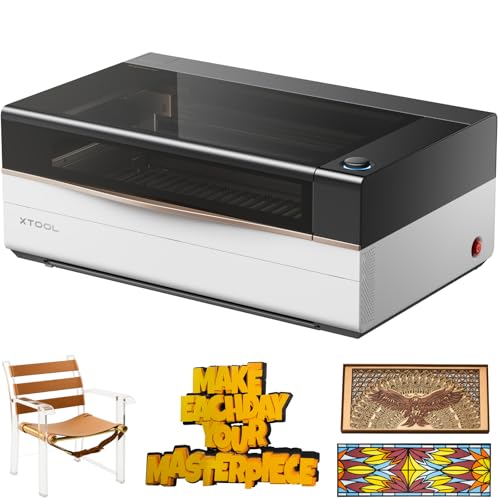
xTool P3 80W CO2 Laser
CO2 EnclosedThe xTool P3 80W is the flagship enclosed CO2 laser for makers who want maximum power and a large format in one machine. The dual HD cameras, ACS auto-focus system, and intelligent automation make placement and focus effortless, while the 36 x 18 inch bed handles full-size signage and batch work that smaller desktop CO2 machines cannot.
Pros
- Powerful 80W CO2 source cuts thick stock fast
- Dual HD cameras for precise material placement
- ACS auto-focus removes manual focus steps
- Large 36 x 18 inch work area for full-size projects
- High 1,200 mm/s engraving speed for batch production
- Enclosed for safety and cleaner operation
Cons
- Highest price in this guide
- Large footprint needs dedicated bench space
- Exhaust and chiller add to total cost
- Overkill for occasional hobby use
Our Verdict
The xTool P3 80W is the best choice for makers who want one machine that does it all at production scale. The power, large bed, and automation eliminate most setup friction. If you want to engrave and cut full sheets without becoming a laser technician, the P3 justifies its premium price.
xTool P2S 55W CO2
CO2 EnclosedThe xTool P2S is a desktop CO2 laser that punches far above its price class. With 55W of power, a large work area, and conveyor pass-through support, it bridges the gap between hobbyist and light production use. The dual 16MP cameras and auto-focus system make setup fast and repeatable, and 3D curved engraving handles cylinders and tumblers.
Pros
- 55W power cuts 10mm plywood cleanly in one pass
- Large 600x318mm work area for full-size signage
- Integrated camera with auto-focus
- Conveyor feeder accessory for batch and long stock
- LightBurn compatible for advanced users
- Significantly less expensive than comparable CO2 machines
Cons
- Requires external air assist pump for best cut quality
- xTool Creative Space software lags behind LightBurn
- Water cooling chiller sold separately for high-duty cycles
Our Verdict
The xTool P2S 55W is the best CO2 laser engraver for serious hobbyists and small business owners who need professional results without a $10,000 investment. The power and work area combination is exceptional at this price point.

Ortur Laser Master 3
Diode (Open Frame)The Ortur Laser Master 3 is the benchmark budget diode laser engraver. The 10W compressed spot diode cuts 3mm plywood cleanly and engraves wood and leather with impressive detail. The oversized 400x400mm work area, active position protection, and LightBurn compatibility make this the best entry-level laser for new users.
Pros
- Excellent value at under $400
- Large 400x400mm work area
- Full LightBurn compatibility
- Active position protection prevents run-on errors
- Large and active user community
- Fast 20,000 mm/min travel speed reduces job time
Cons
- Open frame requires separate enclosure for safety
- Diode laser struggles with clear and light-colored acrylic
- Air assist accessory improves performance but costs extra
- Cannot cut materials thicker than 5-6mm effectively
Our Verdict
The Ortur Laser Master 3 is the best laser engraver under $500 and our top pick for beginners. The large work area, LightBurn support, and active community provide everything you need to start making profitable products from day one.
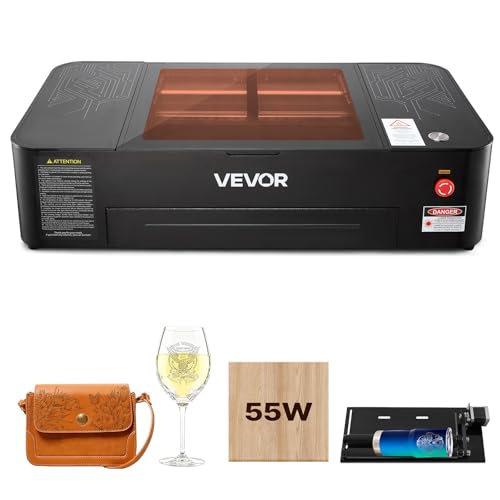
VEVOR 55W CO2 Laser
CO2 EnclosedThe VEVOR 55W CO2 laser is the value pick for makers ready to step into a real CO2 cutter without a premium-brand price. The 20 x 12 inch bed, 16MP camera, included water pump, and rotary axis cover the core needs of a small production shop, and the controller works with LightBurn, CorelDRAW, and RDWorks.
Pros
- Strong value for an enclosed 55W CO2 cutter
- 20 x 12 inch work area for signage and panels
- 16MP camera for material placement
- Water pump and rotary axis included
- LightBurn, CorelDRAW, and RDWorks compatible
- Cuts wood, acrylic, leather, and engraves glass
Cons
- Build quality is not at premium-brand level
- Some units need alignment and tuning out of the box
- Exhaust system is basic and benefits from an upgrade
- Chiller recommended for long high-duty sessions
Our Verdict
The VEVOR 55W CO2 laser is the right machine if you want a real CO2 cutter on a tight budget. The bundled camera, pump, and rotary axis make it production-ready out of the box, and broad software support means you are not locked into a proprietary app.

xTool M2 10W
Diode (Enclosed)The xTool M2 10W delivers CO2-like performance from a fully enclosed diode laser platform. The 20W optical power cuts thick pine in one pass and engraves stainless steel without cermark. The enclosure, large 23.9 x 15.2 inch bed, and xTool Creative Space ecosystem make this the premium diode laser for power users who want safety and capability without a full CO2 system. A rotary attachment is included for tumblers.
Pros
- 20W optical power rivals entry-level CO2 machines
- Fully enclosed for safer operation than open-frame diodes
- Engraves stainless steel directly without cermark
- Large 23.9 x 15.2 inch work area
- Rotary bundle included for tumblers and cylinders
- Compatible with xTool Creative Space and accessories
Cons
- More expensive than open-frame 20W diode lasers
- Higher power means serious eye protection still required
- Struggles with clear acrylic like all diode lasers
- Larger footprint than basic diode machines
Our Verdict
The xTool M2 10W is the best diode laser for users who want maximum performance and an enclosed design without moving to a CO2 system. If you engrave metal regularly and cut wood up to 8mm, this machine eliminates the need for a more expensive and complex CO2 setup.

OMTech 60W CO2
CO2 EnclosedThe OMTech 60W CO2 is the best-value large-bed enclosed CO2 laser for woodworkers and small shops upgrading from a diode machine. It offers a generous 28 x 20 inch work area, 60W of cutting power, an autolift bed, 4-way pass-through, and a Ruida controller compatible with LightBurn. It delivers professional CO2 performance at a fraction of the cost of premium brands.
Pros
- Exceptional value for a 60W enclosed CO2 machine
- Ruida controller is fully LightBurn compatible
- Large 28 x 20 inch work area handles most projects
- Cuts 10mm acrylic and 8mm wood cleanly
- Water cooling system included
- Strong OMTech community and support resources
Cons
- Build quality is not at Thunder Laser or Epilog level
- Some units require alignment and tuning out of box
- Exhaust system is basic; upgrade recommended
- Customer support quality can be inconsistent
Our Verdict
The OMTech 60W CO2 is the best mid-range CO2 laser engraver for budget-conscious shops. If you are willing to do initial setup and alignment, you get professional CO2 cutting capability at a price that makes serious production profitable.

xTool F1 Ultra Fiber Laser
Fiber + Diode (Galvo)The xTool F1 Ultra pairs a 20W fiber source with a 20W diode in one galvo machine, making it the most versatile metal-marking laser in this guide. The fiber beam marks and engraves stainless steel, aluminum, brass, and titanium, while the diode adds wood and plastics. The 16MP smart camera, auto streamline, and 3D engraving make production batches fast and repeatable.
Pros
- Dual 20W fiber and 20W diode covers metals and non-metals
- Extremely fast galvo scanning up to 10,000 mm/s
- Marks and engraves all metals without cermark or coatings
- Long fiber source life
- 16MP smart camera and auto streamline for batches
- Compact tabletop footprint
Cons
- Work field is small compared to CO2 beds
- Galvo software has a learning curve
- Premium price for a specialized machine
- Requires laser safety enclosure and proper eyewear
Our Verdict
The xTool F1 Ultra is the definitive choice for any shop doing metal marking, part numbering, or jewelry engraving that also wants wood and plastic capability. If your work involves metals, no CO2 or diode-only laser can match its speed and quality, and the dual source makes it far more flexible than a fiber-only marker.

Photo via Unsplash
Laser Engraver Buying Guide
Selecting the right laser engraver depends on your materials, volume, budget, and workspace. Here is what matters most:
Frequently Asked Questions
What is the best laser engraver for beginners?
The Ortur Laser Master 3 is our top pick for beginners. It offers a 10W diode laser, a generously sized 400x400mm work area, and LightBurn-compatible control at under $400. The open-frame design means easy material loading, and the growing community provides ample tutorials and support to get productive quickly.
What is the difference between a CO2 and diode laser engraver?
CO2 lasers use a gas tube to produce a 10,600nm infrared beam, which cuts and engraves a wide range of non-metal materials including wood, acrylic, leather, and fabric with exceptional edge quality. Diode lasers use semiconductor chips producing a shorter wavelength (typically 400-500nm), which cuts wood and engraves metals but is less effective on transparent or reflective materials. CO2 machines are generally more expensive and require enclosed designs for eye safety.
Can a laser engraver cut metal?
Standard CO2 and diode lasers cannot cut metal, but high-power diode lasers (10W+) can engrave bare metal and coated metals with cermark or other marking compounds. Fiber lasers are specifically designed for metal marking and engraving on stainless steel, aluminum, brass, and other metals. Cutting metal requires industrial-grade fiber or CO2 lasers with kilowatt-class power.
Do I need ventilation for a laser engraver?
Yes, all laser engravers produce smoke and fumes that require ventilation. Enclosed machines like the xTool P3 and P2S use built-in exhaust fans or duct connections. Open-frame machines need an external enclosure with exhaust ducted outside or a quality filtration unit rated for laser smoke. Cutting acrylic and certain plastics produces particularly toxic fumes requiring active air filtration.
What software do laser engravers use?
LightBurn is the industry standard software for laser engravers, supporting most CO2 and diode laser machines. It handles vector cutting, raster engraving, and image tracing at a one-time cost of $60. xTool machines also use xTool Creative Space for free. Glowforge uses its own cloud-based app which is simpler but less powerful. For fiber lasers, EzCad2 is the standard software.
How thick of wood can a laser engraver cut?
A 40W CO2 laser can cut 1/4-inch (6mm) plywood cleanly in one pass and 1/2-inch (12mm) with multiple passes. A 55W CO2 laser handles 3/8-inch (10mm) in one pass. Diode lasers in the 10-20W range cut 1/8-inch (3mm) plywood reliably in one pass. For thicker cuts, multiple passes slow production significantly and can cause charring on some materials.
Related Calculators & Resources
Use these tools to plan your laser engraver workspace and power setup:
As an Amazon Associate, WorkshopCalc earns from qualifying purchases. Our recommendations are based on research into specifications, pricing, and verified owner reviews, not hands-on testing. We only recommend products we believe provide genuine value to workshop owners and makers.